
Finding the right video footage shouldn’t feel like searching for a needle in a haystack.
For many riders, a single ride can generate dozens of video files across a week, month, or even an entire season of riding. While filenames and timestamps technically contain the information you need, we noticed a common frustration from Cycliq users:
“I think I know where that car close passed me… but I can’t remember which video file it was in.”
So we started thinking differently.
Instead of asking riders to identify footage from a long list of videos, what if CycliqPlus could simply show you where the footage belongs on a map?
That idea led to one of our newest features:
Strava Calendar Map
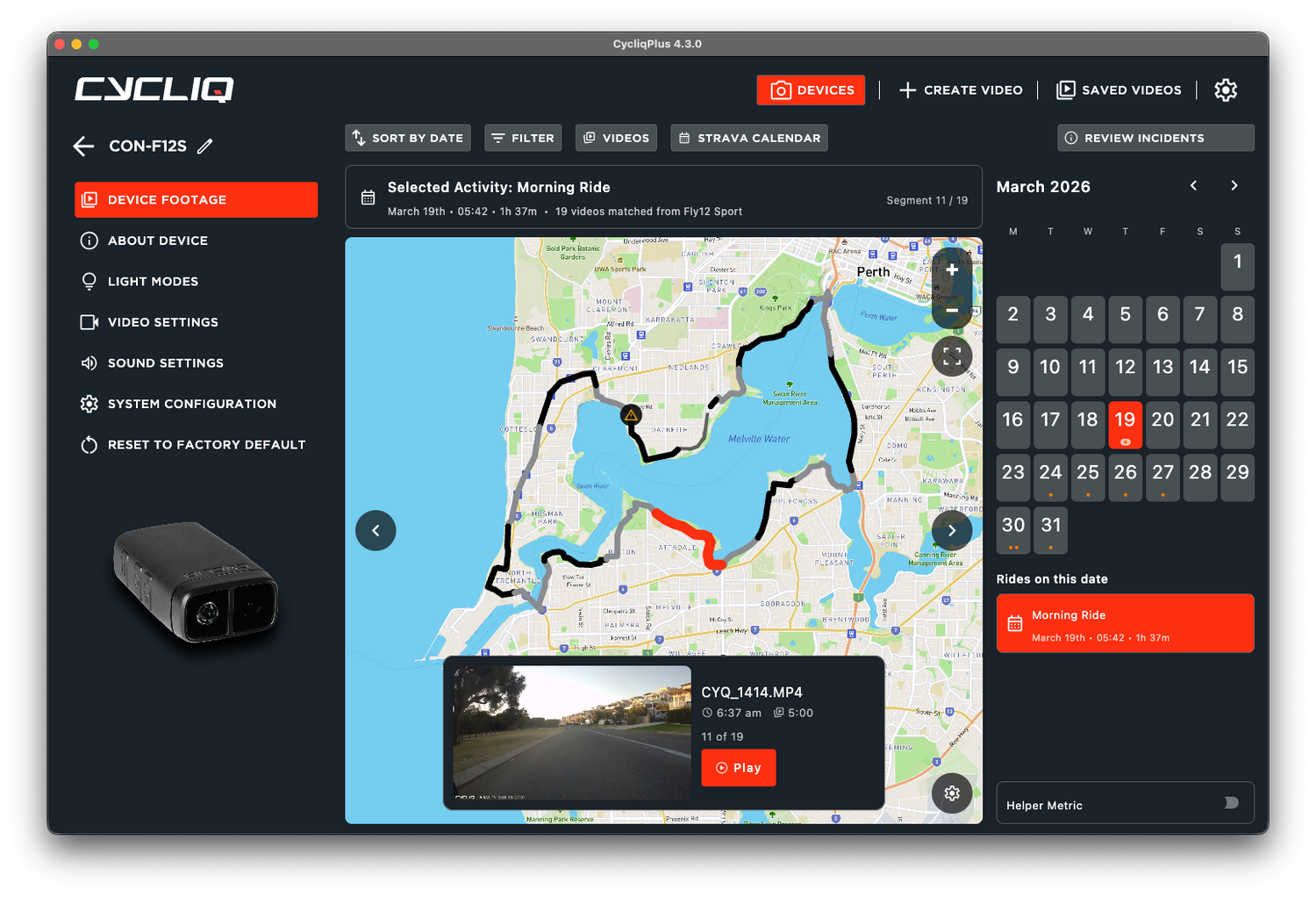
The new Strava Calendar Map in CycliqPlus automatically matches your Fly6 and Fly12 footage to your Strava rides, giving you a visual way to browse and locate footage based on where you rode.
Rather than scrolling through filenames and timestamps, you can now:
- Select a ride directly from your Strava via the calendar
- View your ride route on an interactive map
- See matched video segments placed along the route
- Jump directly to the footage you want
- Quickly identify where incidents occurred
It turns your footage library into something much more intuitive and useful.
A Better Way to Find Your Footage
Cyclists naturally remember rides geographically.
You probably don’t remember:
- “The incident happened at 6:37am in file CYQ_1414.MP4”
But you do remember:
- “It happened near that intersection by the river.”
That’s exactly the problem this feature solves.
By matching footage to your Strava activities and plotting segments along your route, CycliqPlus makes it dramatically easier to:
- Find memorable moments
- Review specific sections of a ride
- Locate incidents quickly
- Navigate long rides with confidence
- Organise and review footage visually
Incident Highlighting
One of the most useful additions is incident visibility directly on the map.
When an incident is detected, CycliqPlus highlights the location on your ride route so you can immediately see:
- Where it occurred
- Which segment contains the footage
- The surrounding context of the ride
This makes reviewing important events significantly faster, especially on longer rides with many recorded clips.
Accurate Time Matters
To correctly match footage with Strava activities, your Cycliq device needs to have a reasonably accurate internal clock.
If your Fly6 or Fly12 hasn’t connected to one of our apps in a long time, the device time may drift slightly over time, which can affect automatic ride matching.
We recommend connecting your device semi-regularly to keep the clock accurate — preferably using our mobile apps, as they provide the easiest and most reliable syncing experience.
Using the Garmin Connect IQ Data Field?
Good news: if you’re using our Garmin Connect IQ data field, your device time should be spot on every ride, making automatic matching extremely accurate.
Designed Around Real Rider Feedback
The Strava Calendar Map is one of those features that came directly from watching how riders actually use their footage.
People weren’t struggling because the videos were missing.
They were struggling because the videos lacked context.
By combining Strava ride data with Cycliq footage, we’ve made reviewing rides feel more natural, visual, and connected to the way cyclists actually remember their journeys.
We’re excited to see how riders use it — whether it’s reviewing incidents, reliving epic rides, or simply finding that one moment without digging through endless video files.
Update to the latest version of CycliqPlus and give the new Strava Calendar Map a try.